I also admit that when I first watched the videos and saw what various schools both public and private were doing, I felt a very high level of frustration because of how behind and restricted the school district is. As I started to see the amount of free resources available, I started brainstorming more creative tactics and will slowly start introducing these ideas to staff, students and peers to do the best we can with what we've got. I hope that as I start to enforce the use of wikis for use of social studies and science curriculums my staff will see the benefits and extend the tools to their work as well as with their students.
Thursday, June 14, 2012
Final Reflection
I also admit that when I first watched the videos and saw what various schools both public and private were doing, I felt a very high level of frustration because of how behind and restricted the school district is. As I started to see the amount of free resources available, I started brainstorming more creative tactics and will slowly start introducing these ideas to staff, students and peers to do the best we can with what we've got. I hope that as I start to enforce the use of wikis for use of social studies and science curriculums my staff will see the benefits and extend the tools to their work as well as with their students.
Saturday, June 2, 2012
Week 8: Personal Learning Networks
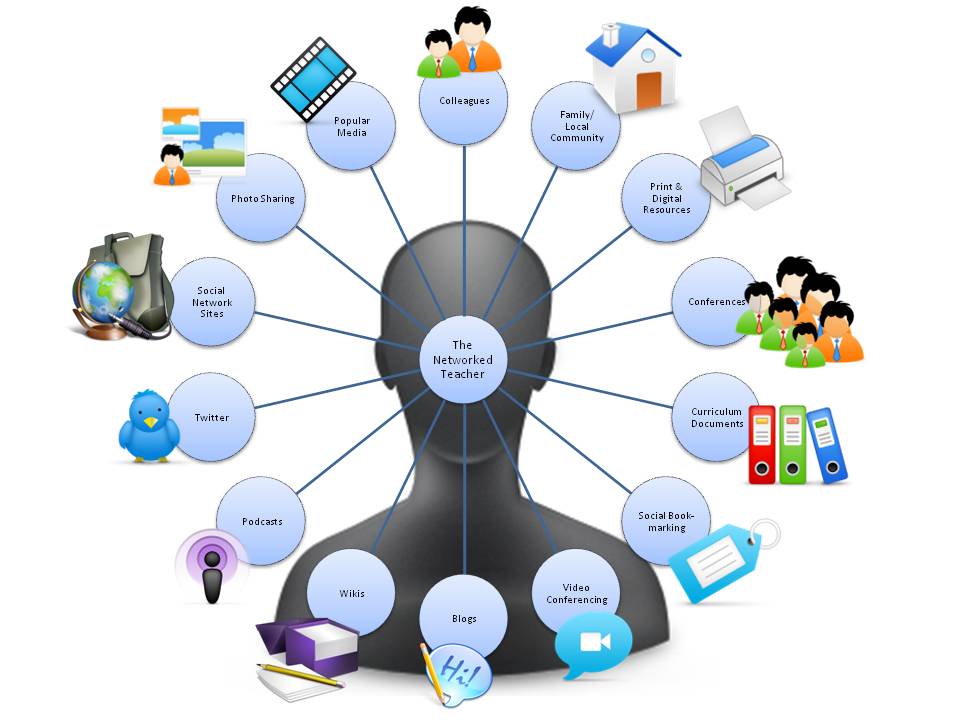
Until recently, I have been always looking towards mentors, listening and learning from their experiences. I am at the point in my career now where I becoming a mentor and able to share experiences, lessons learned and best practices with our more junior teachers. For growth both personally and in our staff, I believe sharing experiences only improves working relationships among staff, and with those throughout our school district.
With technology, we now have a greater ability to expand our PLN's not only regionally, but globally as well. For example check out this Pinterest example of an educational PLN. Just on this one example alone - the options are overwhelming! And there is an interest group for just about any type of PLN group you may want to join, gain and share experiences with.
We all have these networks from peers within our school, courses we enroll in and workshops we attend, as our careers evolve so have our PLNs and it is only going to improve with technology and the ability to subscribe to RSS feeds, join communities with common interest as well as courses such as this one, where we need to virtually collaborate and share ideas.

Webinar: Tracey Wilen-Daugenti on How Technology is Reshaping Education, Work, and Society
Tuesday, April 17th:
Tracey Wilen-Daugenti on How Technology is Reshaping Education, Work, and Society
From the Amazon book description:"Higher education in the U.S. has traditionally prepared students for work and social success, but with families, work, and society itself undergoing revolutionary change, is this preparation sufficient to develop the 21st-century workforce? This book explores how evolving family structures, new ways of balancing work and personal lives, and rapid technological advancements will transform the ways that U.S. colleges and universities develop well-educated, career-oriented citizens. Society 3.0 will help higher education providers and industry leaders understand these potentially disruptive variables and design appropriate programs and career paths for tomorrow's workers.
Review
This webinar was interesting and not what I really expected. Daugenti's focus was primarily on learning patterns and how technology has helped increase resources for continuing educations, specifically at the collegiate level, with specific references to the University of Phoenix and how they are continuing to evolve the teaching methods to help accommodate the variety of learning types that exist. When you click on the url for the University of Phoenix, you will instantly see the push for customization to taylor to your learning styles. There was also a heavy focus on women, how society has changed and the impact on the career and education experiences.
The overall tone of the webinar was a little dry and hard to maintain interest, but this may be also because I was looking of more of a focus on how technology is reshaping education in general and not just a focus on higher education. My hope was to get a better understanding of learning patterns and how we can apply them to our classrooms, so that students are better prepared for higher education options and how they can understand their learning patterns and make decisions that will be of the greatest benefit to them. Personally I felt it was more beneficial to myself and learning all of the different options available to me and my continuing education.
Daugenti is a wealth of knowledge and I felt like the webinar would of been more interesting if she was able just to present her work and Hargadon was a minimal participant rather than leading the questions and jumping topics. It was a good experience, however I had a different expectation of what I would get out of this topic vs. what I actually did get from it.
Sunday, May 20, 2012
Week 7: Learning inHand
So I understand all the advantages and what students and educators can accomplish with technology in the classroom, and I raised the usual question to myself... How can I get this in my school for my students? My answer is grants, and donations. We need to find a way to get the funding for these tools in our school, and that is where my research needs to start. Once I find a substantial list of resources, my next step is to socialize and publish these resources to my staff. If our school is proactive in getting the latest technology, we've got to make a breakthrough and get something to start with, right?
I have realized that there is a level of frustration I feel when I watching the innovations in education and our district is struggling with the same battles year after year, more pink slips, less funding, increased class rooms as well as out-dated and very limited accessibility to state-of-the-art equipment.
There are lots of benefits to iPads, iPods and OpenSource technologies for both students and educators. As an administrator and as a parent, I want my students and children to have the ability to access these tool and start using them to bring learning to life, especially as Brian Crosby does in his classroom.
That being said, as a school we can start small and share any tools we get, such as iPads, but we will need to be creative in how we share them and build upon our technology library. We also need to find ways to take advantage of what we have in our classroom today and push the boundaries with the use of open source and free tools, such as we watch this week in Brian Crosby's TEDxDenverEd talk. I don't think my school is specifically ready to support the tools Tony Vincent shows in the iHand videos, but we can set it as a big picture goal to reach.
Week 7: Project Based Learning and Technology
Project based learning with technology has a multitude of benefits for the lesson, the student and the teacher. With this model you can create immediate engagement with your class, and bring reading, writing, science, social studies, and math together in a way that the students do not even realize the amount of learning they have done!
The most challenging aspect of this style of teaching/learning environment is assessing and highlighting that the students have learned what is necessary for success on standardized test, such as the NECAPs. It would be great if we could create a Project that had a rubric aligned to the NECAP assessment and the ability to grade/align the core standardized testing fundamentals to the project based learning curriculum, and this wiki shows that there are some districts and educators who are already attempting this in the classrooms.
In relation to the NECAP and the struggles the Manchester School District continues to have with bringing technology to the classroom, the state wants to move all testing to an online format but can not because our city is not able to facilitate this for the entire district, this recent Union Leader news article highlights what we are struggling with and how constrained the entire district is with lack of funding and outdated technology. As usual, I think about the technology we are learning about and its uses, then wonder if Manchester will ever be able to accommodate these innovations within the classroom.
Sunday, May 6, 2012
Week 6, Podcast: Northwest Elementary School Million Word Challenge Celebration
This podcast was taken during our Million Word Challenge Celebration. It is our elementary school singing "Gotta Keep Reading" to kick off our Million Word Challenge Celebration. Every student that participated, successfully read 20 books each month of the school year. Enjoy!
Sunday, April 29, 2012
Week #5: Forget about the Textbook
Listening to Dr. Mazur was thought provoking, and really interesting. What caught my attention during his lecture is the discovery of how difficult it is to teach something that you are learned a long time ago, and became an expert in. I think everyone can relate to forgetting what is was like for you were in learning a specific topic (ex. multiplication), especially if you have been teaching a particular subject for years. It is a nice reminder to take a step back and look at the topic from your student's perspective, not just yours as an educator.
I think peer teaching is a great way for students to collaborate in the classroom. Not only does it put students in a better position to relate to each other, it helps you as an educator quickly assess your classroom and see where the students as a collaborative group understand the topic at hand. With the use of technology, you can extend peer teaching outside the classroom with the use of a wiki or blog focused on the specific topic.
Dr. Mazur's research and results, shows us as educators that it is not the ability to memorize a "recipe" from a textbook is what we are meant to do, but our role is to facilitate strong questions that help our students think, share and thoroughly understand the concepts that we teach. If we are helping them understand the core fundamentals, based on the statistics Dr. Mazur showed, we should see improvements in test results, such as NECAPS and a continued improvement in AYP within a school.
A great reminder that as educators, our goal is to create life long learners in our students with a strong understanding of core fundamentals to make them successful.
I think peer teaching is a great way for students to collaborate in the classroom. Not only does it put students in a better position to relate to each other, it helps you as an educator quickly assess your classroom and see where the students as a collaborative group understand the topic at hand. With the use of technology, you can extend peer teaching outside the classroom with the use of a wiki or blog focused on the specific topic.
Dr. Mazur's research and results, shows us as educators that it is not the ability to memorize a "recipe" from a textbook is what we are meant to do, but our role is to facilitate strong questions that help our students think, share and thoroughly understand the concepts that we teach. If we are helping them understand the core fundamentals, based on the statistics Dr. Mazur showed, we should see improvements in test results, such as NECAPS and a continued improvement in AYP within a school.
A great reminder that as educators, our goal is to create life long learners in our students with a strong understanding of core fundamentals to make them successful.
Week #5: It's Not About the Tool
Great article! As I read through this article, it immediately caught my attention in clearly explaining the differences between using a blog and a wiki in the classroom, "don't use it just to say you have one or the other in your classroom, make it count." At times, it seems like teachers get this tools set up and have them for the students, staff or parents, but it is not always used as a collaborative tool. Some use it more as a publishing tool for classroom news and homework, for this type of use I think teachers should consider using a web site to publish classroom news.
This quick article helps to provide quick and clear direction on how to both a blog and a wiki. I am planning to share this with my staff each year, as a stepping stone to teaching them the differences between each as well as ideas to incorporate them in the classroom. For blogging, I am looking into ClassPress.com, this is because it keeps your blog within the classroom, "no one outside your class can view or participate without your permission."
Another resource I came across is about "How Can I Use a Wiki in the Classroom?", which I think will be helpful in guiding staff in the best ways to take advantage of free technology and pushing for the continued integration of it more regularly in the classroom. This helped me think of small, free steps our classrooms can take to make big steps into using technology more frequently and within our district's slim budget.
Overall, if we can agree upon the proper use of wikis, blogs and web sites within our classrooms as well as provide the rules of the road to students and staff, our students will be able to take advantage of the technology tools within the limited capabilities of our district.
Sunday, April 22, 2012
Week 4, PBS Video
In this video, there is a lot to take in around the use of digital media in the classroom and outside the classroom. I appreciate the digital based schools approaches and ways they leverage digital media to teach, however is it realistic for us as a country, this article addresses the broken structure we have to fund public education. A few things I never heard mentioned by the anyone interviewed and would like to know:
- Are these public or private schools?
- Who is purchasing the technology? Schools? Tuition? Parents?
- How are they able to afford the maintenance of software and stay up with current cutting edge technology?
- What are their staff's backgrounds? What is their required trainings to keep up with 21st Century Learning?
Based on what I saw and listening to those interviewed, I don't think the technology is what we need to teach or structure curriculum around. It is the ability to be problem-solvers, learn how to work with others and become life-long learners, that will be open to change, and find ways to adapt to our ever-changing technological landscape. One recent article I came across Programming project comes to primary schools, discusses establishing coding clubs for elementary students to help teach about computer programming. I agree that it is important to expose students to the technology, how its used and works, but it is not necessarily going to be the only driver to keep students as life-long learners.
I think the biggest concern for public educators, is how can we facilitate the same problem-solving skills with limited technology, out-dated software and lack of resources. Currently, we fortunate to have paper until the end of the year, let alone supplying laptops for an entire classroom to use, even as a mobile computer lab. We can't assume that regular use of the latest technology is the answer to an improved education but making sure that our students have the desire to be life-long learners and ability to adapt to the technology as they grow.
Saturday, April 21, 2012
Week 4, Social Bookmarking
Initially, when I first started reading about social bookmarking - I was a little hesitant. Anytime social, web and education are put together, it is a fine line to walk, see page 10, Educational hopes and fears of Web 2.0. I enjoy the ability personally, to consolidate all my resources into a single place with the ability to access them from any computer, tablet or mobile device. In terms of use within public education, I believe we need to provide parameters to students, staff and the community.
For example Diigo and other open forums do not allow restrictions, such as appropriate tagging of content, it is subjective to the users. As an administrator, I want to assure my students, staff and parents are receiving appropriate information in the appropriate context, as the attached link discusses the pros and cons of technology in the classroom. You do not want staff or students exploring beyond their bounds. It would be beneficial for this type of forum to be customized for a district or particular school to assure proper content reviews/approval processes are completed prior to publication. We want to be collaborative, but I also think it is important establish rules of use to ensure proper use of these resources as they are becoming increasingly more popular and an essential way for us to communicate.
Overall, the ability to bookmark and categorize your resources by subject, year, author, web site is great. I can see this being rewarding to educators as they regularly find new tools everyday and this provides the ability to share, save and reuse no matter where they are, as it typical for us to accumulate years of resources, especially now with the Internet and ease of access.
Monday, April 2, 2012
Reaching & Teaching the Millennial Student: Teaching & Reaching the Millennial Learner: New Possibilities for the Information Age.
The sky is the limits for the students of the 21st century, only if we can introduce them to all the technology out there and teach them to use it in the classroom and real world. Technology/web 2.0 tools only make student work and collaborative learning that much more productive. People/students are able to communicate faster, retrieve data faster, work with people from all over the world, and all at the same time. Integrating technology into classroom instruction means more than teaching basic computer skills.
Effective technology integration must happen through out the curriculum in ways that research shows strengthens the learning process and successful integration is reached when the use of technology is routine and transparent. There is so much out there that can catch the interest of students when using technology such as scratch, animato, netvibes, skype, and wikkis. Another good thing about using technology and web 2.0 tools is that most of them are free and compatible with many of today’s media devices.
A school that is correctly implementing technology is changing the way teachers teach, offering educators effective ways to reach all types of learners and assess student understanding through multiple methods. Technology also improves the relationship between teacher and student. Technology helps make teaching and learning more meaningful and enjoyable.
Virtual Learning Communities
Virtual Learning Communities can be an incredible experience, but can also be a very negative experience. The key to having a successful virtual learning community is finding reputable communities that have properly credential members that our working together for a common goal. In these communities there need to be stakeholders that are willing to put the time and effort needed in to keeping the learning community up to date and running properly with authentic and reliable posts/information being presented. Virtual learning communities need to have multiple members continuing to update the material and keep the dialogue going.
With today’s technology virtual learning communities can bring people from halfway across the world together and give users the ability to retrieve information that in the past would be unimaginable. We can now share pictures, videos, power points, lectures, and more at the touch of a button and for little to no costs. The learning communities and the people /professionals they bring together can only improve teacher development and the teaching of our student if done properly. The results from virtual learning committees are endless and far out way the learning of the past.
A Portal to Media Literacy
The video was very dry and I wouldn’t have survived this lecture if I had to attend. It seemed to be more geared for teaching more at the college level than k-12. There were some good concepts and points that would apply to K-12 grade level. The piece that I thought was very strong and meaningful was about the teaching environment of today being out of date and that our student are not learning to learn or excel, but to learn what they need too for the class. Students are not learning and going to that next level of exploring and using this information. That is a big problem in education with children doing the bare minimum to pass and not fully exploring, learning, and working with the subject matter. They are learning just enough to pass and limiting their learning by doing so.
Young students need to be given the technology (sites and tools) and letting them explore the new technology and work with it to help improve their lives. Students love technology. Web 2.0 tools such as google doc or flip board can help these students organize so much of their online activities, so they are not so spread out and have to open millions of windows to get all their info. Then also using skype, blogs, and wikki to bring all students together to present class ideas and the speed and easy these tools bring to collaborative learning. Teachers themselves should be using these tools. We are currently working with our social studies and science curriculum and I am looking into setting up grade level wikkis to have the teachers use the wikki to set up the curriculum and resource to be taught, so every grade level and teacher are able to see this curriculum and develop it.
Tuesday, March 20, 2012
Thoughts on Class
Looking
forward to learning more about web 2.0 tools and how to use them more in the
educational setting at the elementary level. I am currently an assistant
principal and technology coordinator at a K to 5 elementary school with over
650 students and 90 staff members.
Technology is very important piece of teaching the students of the 21st
century and needs to be addressed.
The
problem I’m finding is getting the resources and time to be able to have staff
PD to use the technology, and then having the time during the day to teach the
students how to use this technology. That’s if we are given the equipment and
freedom to go to these sites and the technology we are given is up to date.
Technology unfortunately takes a back seat to No Child Left Behind and NECAP
testing. Especially, if you are a title one school with state requirements that
need to be met yearly in mat and language arts.
Chapter 1 Thoughts
Technology is extremely important to teaching the
students of the 21st century. Technology is touching almost every
part of our lives, our communities, our homes, and our classrooms. Many are
just beginning to explore the true potential technology offers for teaching and
learning. Properly used, technology will help students acquire the skills they need to survive in a complex, highly technological world.
Integrating technology into classroom instruction means
more than teaching basic computer skills and software programs in a separate computer class. Effective tech integration must happen across the curriculum in
ways that research shows deepen and enhance the learning process. Effective
technology integration is achieved when the use of technology is routine and
transparent and when technology supports curricular goals.
Technology also changes the way teachers teach, offering educators
effective ways to reach different types of learners and assess student
understanding through multiple means. It also enhances the relationship between
teacher and student. When technology is effectively integrated into subject
areas, teachers grow into roles of adviser, content expert, and coach.
Technology helps make teaching and learning more meaningful and enjoyable. In
so many schools this is not happening and in a high tech world where other
countries are way ahead, we as educators need to start implementing technology
into our everyday routine in the classroom so our student will be prepared to
be apart of this high tech society.
Subscribe to:
Comments (Atom)